用于展示业务对象的新建编辑表单。
# 对象表单组件
用于展示业务对象的新建编辑表单。
效果展示:
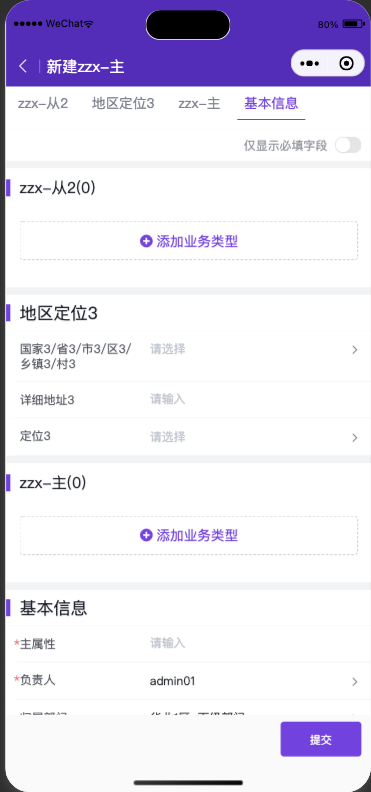
# 组件引用路径 avaComponent://objformpkgbase/pwc/objform/index
# 组件方法
| 方法名 | 说明 | 入参类型 | 返回类型 |
|---|---|---|---|
| load | 触发表单加载及渲染 | Object | void |
| validateDataThenGet | 校验通过后返回表单数据 | Object | Promise |
| triggerSubmit | 触发标准表单提交流程 | Object | void |
# load 方法入参说明
| 属性 | 说明 | 类型 | 可选值 | 默认值 |
|---|---|---|---|---|
| pluginApiName | 必须,插件apiName | String | — | — |
| objectApiName | 必须,对象apiName | String | — | — |
| action | 必须,操作类型, | String | Add|Edit, | Add |
| renderMode | 可选,渲染模式 | String | standard(标准模式,和标准表单页UI完全一致) embedded(嵌入模式,适合字段少且只有主对象的表单,无标题和底部按钮) | standard |
| mainObjectData | 可选,新建动作带入回填主对象的数据,编辑动作指定数据id | Object | — | — |
| detailObjectDatas | 可选,新建带入回填从对象的数据 | Object | — | — |
| KOtherUsefulDataForCreate | 可选,其他补充配置参数 | Object | — | — |
| describeAndLayout | 可选,自定义描述和布局,布局描述结构及定义咨询产研 | Object | — | — |
| formPlugin | 可选,动态表单插件构造函数 | Function | — | — |
| useCustomTitleBar | 可选,使用slot扩展自定义标题组件 | Boolean | — | false |
| useCustomBottomBar | 可选,使用slot扩展自定义底部按钮组件 | Boolean | — | false |
# validateDataThenGet 方法入参说明
| 属性 | 说明 | 类型 | 可选值 | 默认值 |
|---|---|---|---|---|
| validateRequired | 可选,是否校验必填,默认true | String | — | true |
| skipAllValidate | 可选,是否跳过校验逻辑直接返回数据 | String | — | false |
# triggerSubmit 方法入参说明
暂无
# 简单使用
com/index.wxml
<objform id="form" bind:attached="formAttached"/>
com/index.json
{
  "component": true,
  "usingComponents": {
    "objform": "avaComponent://objformpkgbase/pwc/objform/index"
  }
}
com/index.js
Component({
  methods:{
    /**
     * 监听到objform组件attached事件后调用 load 方法触发表单加载
     */
    formAttached(){
      //获取表单组件示例
      this.form = this.selectComponent("#form");
      //触发表单组件加载
      this.form.load({
        pluginApiName:"pwctest__c",
        objectApiName:"object_t6w1q__c",
        action:"Add"
      })
    }
  }
});
效果展示:
# 组件扩展
为了满足企业定制化的需求,这里我们为开发者提供了一些扩展方式,能够快速开发出相应功能。
# 组件插槽
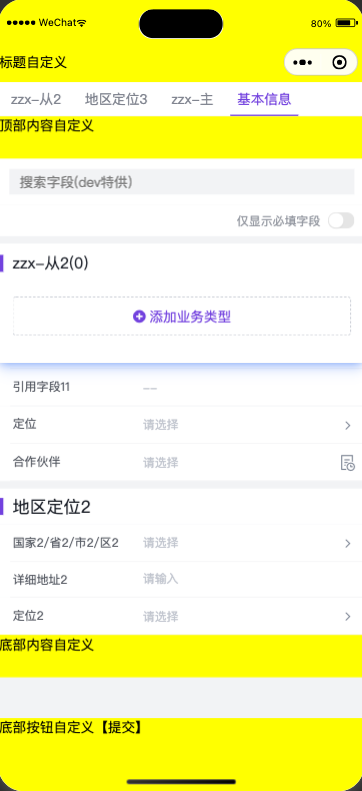
组件插槽允许开发人员将某个组件插入到objform预定的区域。
titleBar和bottomBarslot 仅在renderMode: standard时支持
<objform id="form" bind:attached="formAttached">
        <view slot="titleBar" style="height:48px;padding-top: 50px;line-height: 48px;background:yellow;">标题自定义</view>
        <view slot="topContent" style="height:50px;background:yellow;">顶部内容自定义</view>
        <view slot="bottomContent" style="height:50px;background:yellow;">底部内容自定义</view>
        <view slot="bottomBar" style="height:52px;padding-bottom: calc(env(safe-area-inset-bottom));background:yellow;position:fixed;z-index:12;left:0;right:0;bottom:0;" bind:tap="_submit">底部按钮自定义【提交】</view>
</objform>
效果展示:
# 动态插件
动态插件允许开发人员在表单加载时动态注册插件,插件支持的能力和对象表单V2插件基本一致,可参考对应文档。
com/index.js
Component({
  methods: {
    /**
     * 监听到objform组件attached事件后调用 load 方法触发表单加载
     */
    formAttached(){
      let self = this;
      this.form = this.selectComponent("#form");
      let myPlugin = {
        apply(){
          return [
            {
              event: 'form.render.end',
              target:'*',
              functional: self._formRenderEnd.bind(self)
            }
          ]
        }
      };
      this.form.load({
        pluginApiName:"pwctest__c",
        objectApiName:"object_t6w1q__c",
        action:"Add",
        formPlugin:()=>myPlugin
      })
    },
    _formRenderEnd(p,o){
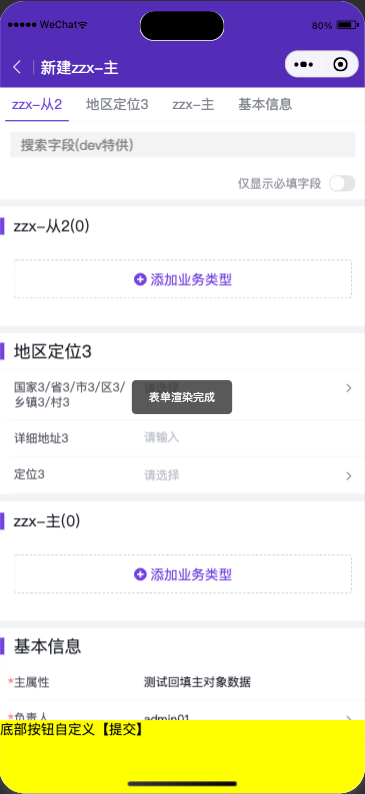
      //效果:表单渲染完成后弹出提示
      console.log("formRenderEnd",p,o)
      wx.showToast({title: '表单渲染完成'})
    },
  }
});
# 更多示例
# 1.加载标准新建表单组件,定制底部按钮
功能:
- 触发标准新建动作加载标准表单
- 底部按钮自定义UI
- 点击自定义的提交按钮后触发标准提交流程。
- 动态注入插件,监听表单加载完成事件
代码:
com/index.wxml
<objform id="form" bind:attached="formAttached">
    <view slot="bottomBar" style="height:52px;padding-bottom: calc(env(safe-area-inset-bottom));background:yellow;position:fixed;z-index:12;left:0;right:0;bottom:0;" bind:tap="_submit">底部按钮自定义【提交】</view>
</objform>
com/index.json
{
  "component": true,
  "usingComponents": {
    "objform": "avaComponent://objformpkgbase/pwc/objform/index"
  }
}
com/index.js
Component({
  methods: {
    /**
     * 监听到objform组件attached事件后调用 load 方法触发表单加载
     */
    formAttached(){
      let self = this;
      this.form = this.selectComponent("#form");
      let myPlugin = {
        apply(){
          return [
            {
              event: 'form.render.end',
              target:'*',
              functional: self._formRenderEnd.bind(self)
            }
          ]
        }
      };
      this.form.load({
        pluginApiName:"pwctest__c",
        objectApiName:"object_t6w1q__c",
        action:"Add",
        mainObjectData:{
          name:"测试回填主对象数据",
        },
        useCustomBottomBar:true,//自定义标题栏组件时,必须设置为true
        formPlugin:()=>myPlugin
      })
    },
    _formRenderEnd(p,o){
      console.log("formRenderEnd",p,o)
      wx.showToast({title: '表单渲染完成', icon: 'none'})
    },
    _submit(){
      this.form&&this.form.triggerSubmit();
    },
  }
});
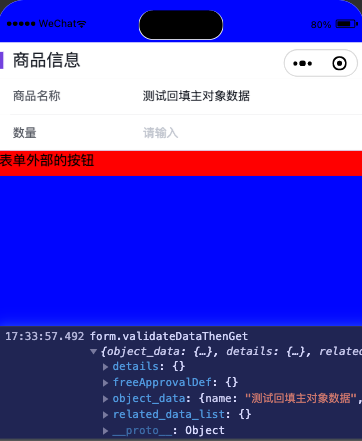
效果展示:
# 2.局部嵌入表单组件,按需获取表单数据
功能:
- 使用自定义描述和布局加载表单
- 点击外部提交按钮后获取表单数据。
代码:
com/index.wxml
<view style="height:50vh;overflow: scroll;background:blue;padding-top: 50px;">
    <view>
        <objform id="form" bind:attached="formAttached"/>
        <view style="height:30px;background:red;" bind:tap="_myBtnClick">表单外部的按钮</view>
    </view>
</view>
com/index.json
{
  "component": true,
  "usingComponents": {
    "objform": "avaComponent://objformpkgbase/pwc/objform/index"
  }
}
com/index.js
//mock 数据
const describeAndLayout = {
  objectDescribe:{
    api_name: "object_t6w1q__c",
    fields: {
      name:{
        api_name:"name",
        type:"text",
        label:"商品名称",
      },
      num__c:{
        api_name:"num__c",
        type:"number",
        label:"数量",
      }
    }
  },
  layout:{
    components:[{
      api_name:"form_component",
      type:"form",
      field_section:[{
        api_name:"sect1",
        header:"商品信息",
        form_fields:[
          {
            field_name:"name"
          },
          {
            field_name:"num__c"
          }
        ]
      }]}]
  }
}
Component({
  methods: {
    /**
     * 监听到objform组件attached事件后调用 load 方法触发表单加载
     */
    formAttached(){
      let self = this;
      this.form = this.selectComponent("#form");
      this.form.load({
        pluginApiName:"pwctest__c",
        objectApiName:"object_t6w1q__c",
        renderMode: "embedded",
        describeAndLayout,
        mainObjectData:{
          name:"测试回填主对象数据"
        }
      })
    },
    _myBtnClick(){
        this.form&&this.form.validateDataThenGet().then((rst)=>{
          console.log("form.validateDataThenGet",rst)
        }).catch((err)=>{
          console.log("form.validateDataThenGet err",err)
        });
    }
  }
});
效果展示: