
Authorization Code Grant
The most commonly used and secure mode in OAuth 2.0, requiring user participation in authorization. Suitable for web applications with backend services. After user authorization, the authorization server returns an authorization code, which the client then exchanges for an access token. This flow provides high security by protecting tokens and user data, supports long-term permissions, and allows token refresh.
# Flow Diagram
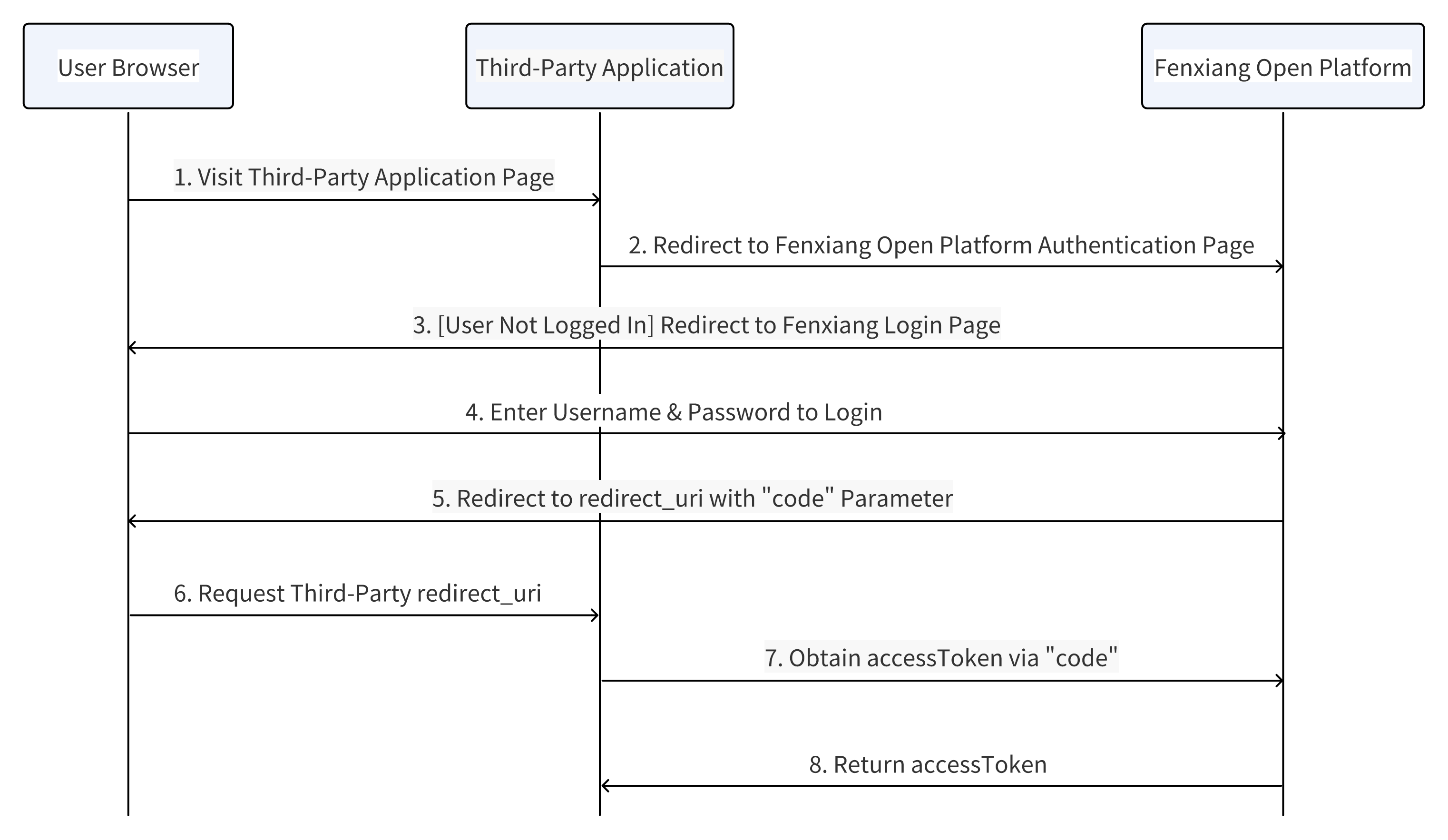
Obtaining user identity through CODE involves certain time overhead. For frequent user identity verification scenarios, the following approach is recommended:
- When users navigate to the enterprise application page, the application should verify if there's a user identity cookie (generated by the enterprise application)
- If no cookie is found, call the identity verification API to obtain user identity, then generate a user identity cookie. The application can then retrieve user identity from the cookie and proceed to the corresponding page
# Obtaining Authorization Code
# Request Specification
Method: GET
Endpoint: https://${cloud domain}/oauth2.0/authorize?responseType=code&appId=APPID&redirectUrl=REDIRECTURL&state=STATE?thirdTraceId=${Random String}
# Request Parameters
| Parameter | Type | Required | Description |
|---|---|---|---|
| appId | String | Yes | The appId of your custom application |
| redirectUrl | String | Yes | Callback URL, domain must match the web redirect URL specified during app creation |
| responseType | String | Yes | Fixed value: code |
| state | String | Yes | CSRF protection parameter, will be returned unchanged after authorization |
# Request Example
https://open.fxiaoke.com/oauth2.0/authorize?responseType=code&appId=FSAID_xxx&redirectUrl=https://www.yoururl.com/xxx&state=77598SDASF
# State Value Explanation
When generating the state parameter for authorization flow, ensure it's randomly generated and avoid duplicates. Example: state = MD5(timestamp + current account). After authorization, Fxiaoke will redirect to your server. Your server should verify if the state parameter matches. If not, reject the request and don't proceed with token exchange. If matched, continue normal flow.
Strongly recommend implementing this process to prevent CSRF attacks.
# redirectUrl Explanation
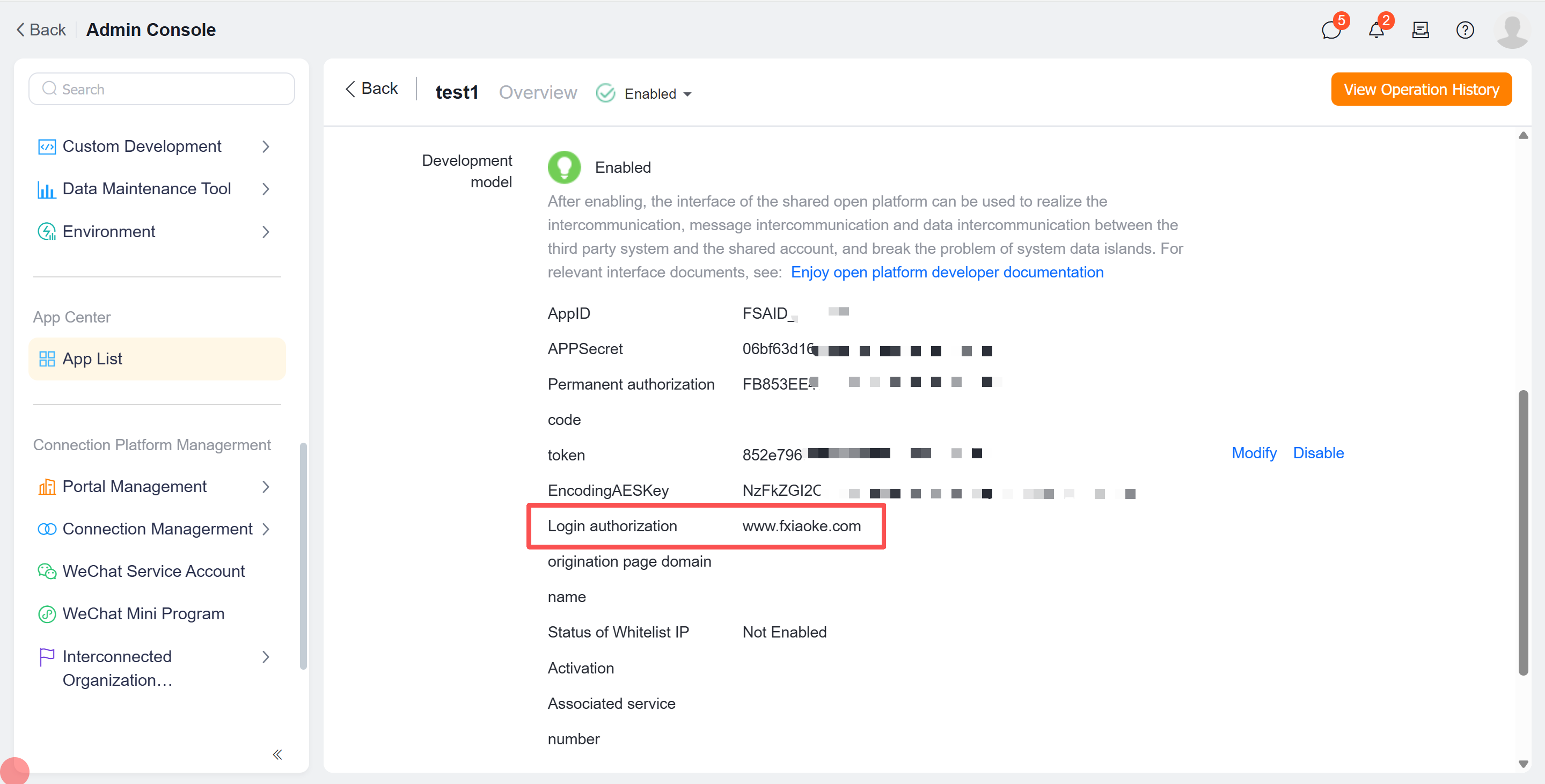
Domain must match the login authorization initiation domain specified in the application details page. For example, if your login authorization initiation domain is www.fxiaoke.com, then your redirectUrl should be https://www.fxiaoke.com/xxx. The specific callback page can be determined by the enterprise, as long as it's accessible.
# Response Parameters
| Parameter | Type | Description |
|---|---|---|
| code | String | Authorization code |
| state | String | CSRF protection parameter, returned unchanged after authorization |
# Response Example
https://www.fxiaoke.com/xxx?code=xxxxxxx&state=77598SDASF
# Obtaining Access Token
Exchange authorization code for access token.
# Request Specification
Method: POST + application/json
Endpoint: https://${cloud domain}/oauth2.0/token?thirdTraceId=${Random String}
# Request Parameters
| Parameter | Type | Required | Description |
|---|---|---|---|
| appId | String | Yes | The appId of your custom application |
| appSecret | String | Yes | The appSecret of your custom application |
| redirectUrl | String | Yes | Callback URL |
| code | String | Yes | Authorization code |
| grantType | String | Yes | Authorization type, fixed value: authorization_code |
# Request Example
{
    "appId": "FSAID_xxxx",
    "appSecret": "98xxxx62e7d",
    "redirectUrl": "https://www.fxiaoke.com/xxx",
    "code": "xxxxx",
    "grantType": "authorization_code"
}
# Response Parameters
| Parameter | Required | Description |
|---|---|---|
| openUserId | Yes | User's openUserId |
| accessToken | Yes | Access token, valid for 2 hours |
| corpId | Yes | Company account issued by open platform |
| expiresIn | Yes | Expiration time |
| refreshToken | Yes | For refreshing accessToken, valid for 2 months |
# Response Example
{
    "errorCode": 0,
    "errorMessage": "success",
    "openUserId": "FSUID_xxxxx",
    "accessToken": "xxxxxx",
    "corpId": "FSCID_xxxxx",
    "refreshToken": "xxxxx",
    "expiresIn": 1580000000
}